uv is a fast Python package and project manager.
Before uv, we needed many tools to manage Python projects and packages:
- pip to install dependencies
- pip-tools to pin dependencies
- pipx to install Python command-line applications
- virtualenv to create virtual environments
- Poetry to manage packaging (build and installation), dependency installation and virtual environments
We can do all these things with uv while being 10x-100x faster than pip. Another reason to use uv is reproducibility through lockfiles.
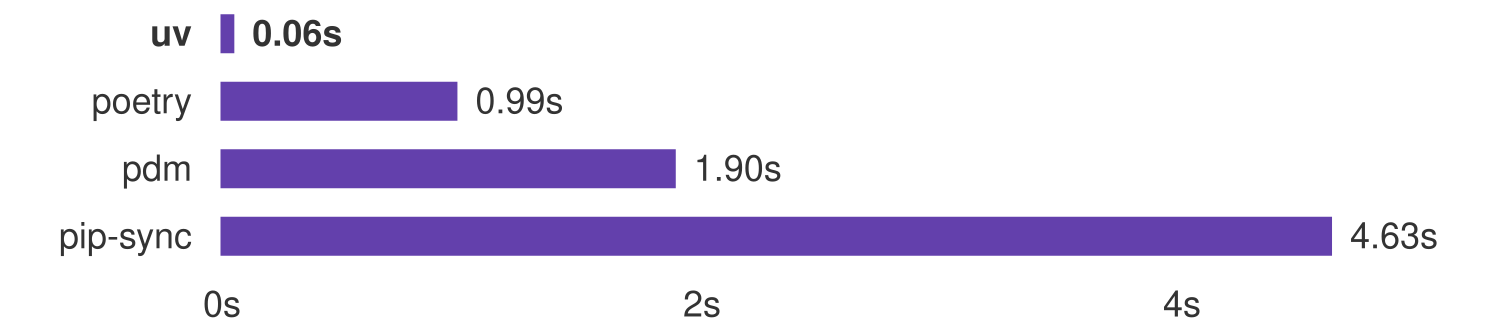
In this post, I will show how to install uv and use it to manage your Python projects and packages.
Installation
We can install uv on Linux, macOS or Windows.
# On Linux or macOS
$ curl -LsSf https://astral.sh/uv/install.sh | sh

# On Windows
$ powershell -ExecutionPolicy ByPass -c "irm https://astral.sh/uv/install.ps1 | iex"
Project management vs package management
uv does two jobs that are easy to confuse.
Package management is about installing, upgrading and removing packages in a Python environment. This is what pip does. It only changes what is installed: nothing records why a package is there.
Project management is about declaring everything your project needs so it can be reproduced anywhere:
- dependencies are listed in
pyproject.toml - exact versions are pinned in
uv.lock - the virtual environment (
.venv) is created and kept in sync - the Python version comes from
requires-python
The difference shows up in one command:
$ uv pip install polars   # package management: installed in .venv, nothing recorded
$ uv add polars           # project management: added to pyproject.toml and uv.lock, then installed
If you delete .venv and run uv sync, polars comes back only in the second case.
Project management
# Create a new project
$ uv init

# Add some dependencies
$ uv add numpy
$ uv add --dev pytest

# Remove a dependency
$ uv remove numpy

# Lock dependencies
$ uv lock

# Sync the environment with the lockfile
$ uv sync

# Pin a Python version
$ uv python pin 3.12

# Install a specific Python version
$ uv python install 3.12

# Build distributions
$ uv build

# Publish to PyPI
$ uv publish
Package management: the pip interface
uv pip is a pip-compatible interface built into uv. Use it when you want to install packages without recording them in the project, or to replace a pip-tools workflow.
# Install a package into the current environment
$ uv pip install numpy

# Pin requirements.in into requirements.txt (like pip-compile)
$ uv pip compile requirements.in -o requirements.txt

# Make the environment match requirements.txt exactly (like pip-sync)
$ uv pip sync requirements.txt
Script Execution
# Execute a script
$ uv run script.py

# Execute a script with an extra dependency installed on the fly
$ uv run --with "numpy==2.0" script.py
We can also declare dependencies inline in a script, using the format from PEP 723. To add them, run uv add --script script.py numpy pandas:
# /// script
# dependencies = ["numpy", "pandas"]
# requires-python = ">=3.12"
# ///

import numpy as np
import pandas as pd
Tool management with uv tool
uv tool install installs a command-line tool permanently, in its own isolated environment. uvx (short for uv tool run) runs a tool in a temporary environment without installing it.
# Install ruff
$ uv tool install ruff

# Run ruff temporarily, without installing it
$ uvx ruff
Security Auditing
uv audit checks the locked dependencies against the OSV vulnerability database. This matters more now that AI agents install packages for us, so we no longer pick every dependency ourselves.
# Audit the project dependencies
$ uv audit

# Audit the dev dependency group
$ uv audit --only-group dev

# Audit a single script that has inline deps
$ uv audit --script analysis.py
What uv Did Not Solve
uv simplifies most of the Python tooling problem for project and package management. However, some are not solved yet:
- Non-Python dependencies: compilers and CUDA still need the OS package manager.
- It can’t solve missing wheels for a platform.
- It cannot solve bad metadata in packages.
- It has no built-in task runner like
npm run.
The first three are limits of the PyPI ecosystem, not of uv itself: uv can only install what maintainers publish. If you need wheels for unsupported platforms, fixed metadata or system libraries, look at conda-forge through pixi. pixi also has a built-in task runner, and it uses uv internally for PyPI packages, so you can use both.
Conclusion
For most Python projects, uv is the only tool you need: it manages Python versions, environments, dependencies, lockfiles, tools and publishing, and it is much faster than the tools it replaces. Reach for pixi when your project depends on system libraries, CUDA, or platforms PyPI does not cover.