Chat templates are used in chat models such as ChatGPT and Qwen to structure multi-turn conversations. If you’ve ever fine-tuned a chat model and gotten surprisingly poor results, the culprit might not be your data or hyperparameters; it could be your chat template. Chat templates define how conversations are structured when talking to models like ChatGPT or Qwen, and using the wrong one can silently hurt your model’s performance.
Example
Let’s start with a simple chat:
chat = [
{"role": "system", "content": "You are a helpful assistant."},
{"role": "user", "content": "What is the capital of France?"},
{"role": "assistant", "content": "Paris is the capital of France."},
]
Applying a Chat Template
To apply a template we can call the method tokenizer.apply_chat_template() like this:
from transformers import AutoTokenizer
model_id = "LiquidAI/LFM2-350M"
tokenizer = AutoTokenizer.from_pretrained(model_id)
inputs = tokenizer.apply_chat_template(chat, tokenize=False)
print(inputs)
This produces the following text:
<|startoftext|><|im_start|>system
You are a helpful assistant.<|im_end|>
<|im_start|>user
What is the capital of France?<|im_end|>
<|im_start|>assistant
Paris is the capital of France.<|im_end|>
How it Works
It assigns roles such as system, user, assistant. Basically it is as follows:
system: The instruction to control the LLM behavioruser: The user question to the LLMassistant: The LLM response
Some models may support additional roles, such as tool for tool-calling contexts.
Under the Hood
Under the hood, the tokenizer uses jinja to handle chat templates. It can be seen in the model repo on HF in the tokenizer_config.json file or chat_template.jinja file.
Here’s a simple example of what a Jinja-based chat template might look like inside a model:
{{bos_token}}{% for message in messages %}{{'<|im_start|>' + message['role'] + '

' + message['content'] + '<|im_end|>' + '

'}}{% endfor %}{% if add_generation_prompt %}{{ '<|im_start|>assistant

' }}{% endif %}
What If a Model Doesn’t Have a Chat Template?
Not every model supports chat formatting. If the model does not have a chat template like openai-community/gpt2, calling the method raises ValueError like this:
ValueError: Cannot use chat template functions because tokenizer.chat_template is not set and no template argument was passed! For information about writing templates and setting the tokenizer.chat_template attribute, please see the documentation at https://huggingface.co/docs/transformers/main/en/chat_templatingIn such cases, you can either:
- Manually define your own Jinja template, or
- Use a text format template
Learn more about chat_templating
Why Templates Matter
Most chat-focused LLMs are trained with a specific template. Using a different one at inference or fine-tuning time can degrade performance.
If your input doesn’t match the format the model was trained on, it might misunderstand the structure of the conversation, confuse roles, or produce weaker responses.
A Quick Experiment
For this purpose, Daniel Furman made an experiment and shared some interesting results in this GitHub issue conversation.
Below is a table from his results:
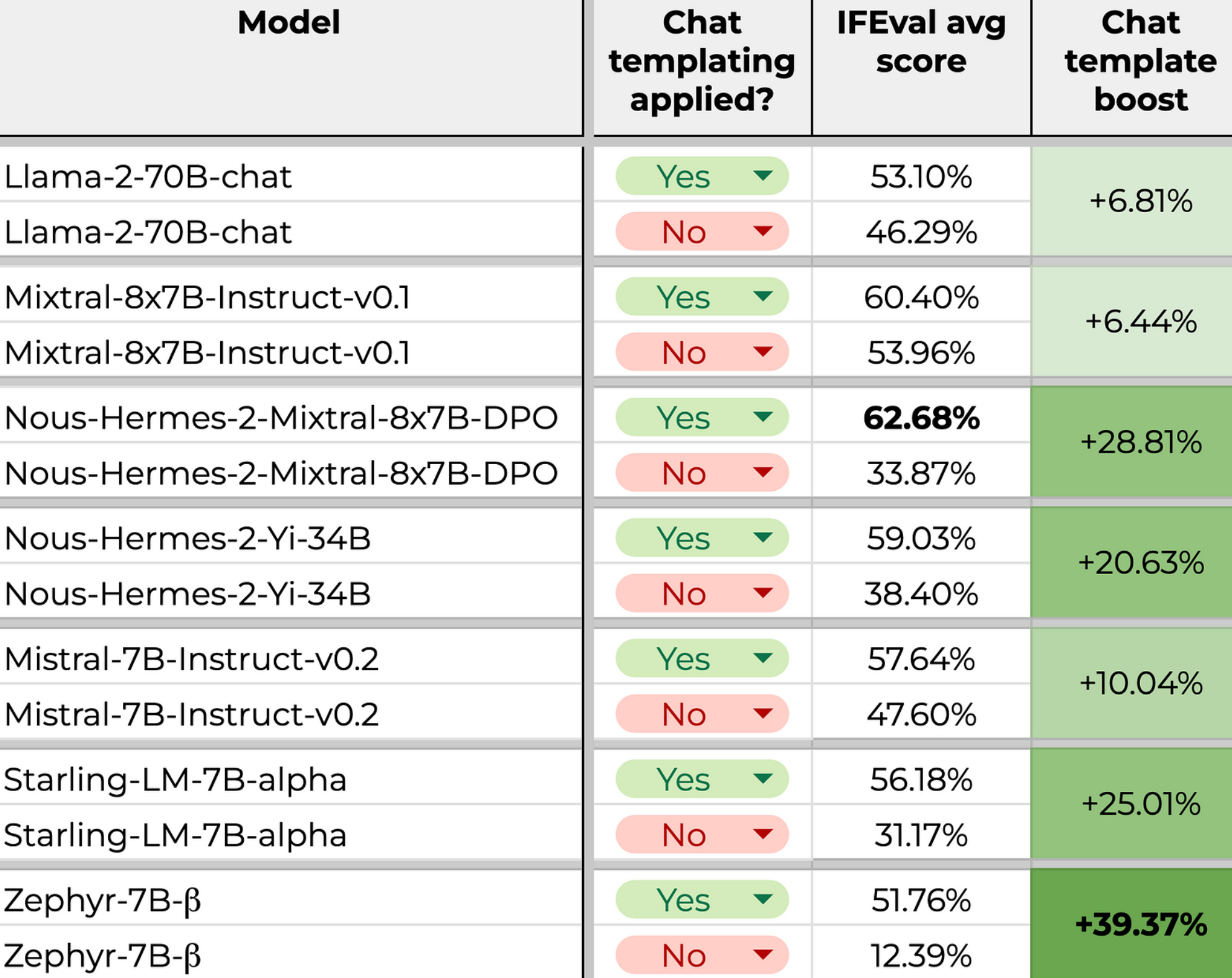
It’s easy to see from the table that using the right template has a big effect on the quality of the generation.
That’s why, when fine-tuning or evaluating chat-based models, matching the training-time template is crucial.
Conclusion
Chat templates are a small but critical detail when working with modern LLMs. Using the correct template when fine-tuning, evaluating, or prompting a model ensures that the model interprets your input as intended and produces better results. When building training pipelines or evaluation harnesses, make template handling a first-class concern, not an afterthought.